enchant.js とこのページについて †
- enchant.js は、Javascriptでゲームを作るためのフレームワーク
- このページは、「ゼロから始める enchant.js 入門【公式ガイド】」で勉強したものを整理したもの

enchant.js のオブジェクト †

- イベントを処理できるクラス
| addEventListener?(type, listener) | イベントリスナの追加。type: イベントタイプ。listner: イベントハンドラ(function) |
| removeEventListener?(type, listener) | イベントリスナの削除。type: イベントタイプ。listner: イベントハンドラ(function) |
| clearEventListener?(type) | イベントリスナのクリア。type: イベントタイプ。省略時は全イベントクリア |
- イベントタイプ
| イベント名 | イベント | リスナを設定できるClass | 備考・参考箇所 |
| Event.LOAD | Game loaded. (The game class call game.onload() when LOAD Event occur by the default) | Game | #lesson1 |
| Event.PROGRESS | Game loading. | Game | |
| Event.ENTER_FRAME | Frame start. | Game, Node | #lesson1 |
| Event.EXIT_FRAME | Frame end. | Game | |
| Event.ENTER | Scene beginning. | Scene | |
| Event.EXIT | Scene end. | Scene | |
| Event.ADDED | Node is added to Group. | Node | |
| Event.ADDED_TO_SCENE | Node is added to Scene. | Node | |
| Event.REMOVED | Node is deleted from Group. | Node | |
| Event.REMOVED_FROM_SCENE | Node is deleted from Scene. | Node | |
| Event.TOUCH_START | touch corresponding to Node has begun. Click is also treated as touch. | Node | #lesson6 |
| Event.TOUCH_MOVE | touch corresponding to Node has been moved. Click is also treated as touch. | Node | #lesson6 |
| Event.TOUCH_END | touch corresponding to touch has ended. Click is also treated as touch. | Node | #lesson6 |
| Event.RENDER | Entity is rendered. | Entity | |
| Event.INPUT_START | button is pushed. | Game, Scene | |
| Event.INPUT_CHANGE | button input changes. | Game, Scene | |
| Event.INPUT_END | button input ends. | Game, Scene | |
| Event.LEFT_BUTTON_DOWN | left button is pushed. | Game, Scene | |
| Event.LEFT_BUTTON_UP | left button is released. | Game, Scene | |
| Event.RIGHT_BUTTON_DOWN | right button is pushed. | Game, Scene | |
| Event.RIGHT_BUTTON_UP | right button is released. | Game, Scene | |
| Event.UP_BUTTON_DOWN | up button is pushed. | Game, Scene | |
| Event.UP_BUTTON_UP | up button is released. | Game, Scene | |
| Event.DOWN_BUTTON_DOWN | down button is pushed. | Game, Scene | |
| Event.DOWN_BUTTON_UP | down button is released. | Game, Scene | |
| Event.A_BUTTON_DOWN | a button is pushed. | Game, Scene | |
| Event.A_BUTTON_UP | a button is released. | Game, Scene | |
| Event.B_BUTTON_DOWN | b button is pushed. | Game, Scene | |
| Event.B_BUTTON_UP | b button is released. | Game, Scene | |
- Game全体のコンテナ
| Game(width, height) | コンストラクタ |
| width | 横幅(int)、未指定時は 320 |
| height | 縦長(int)、未指定時は 320 |
| fps | FPS |
| preload(asset) | assetの読み込み。拡張子によって画像*1または音声*2として読み込まれる |
| assets | preloadで読み込まれた資産(連想配列 key:asset ,value:object) |
| rootScene | 最初に作られるscene |
| currentScene | 現在のscene |
| pushScene(scene) | シーンのスタックにsceneを積む (最後に追加) |
| popScene() | シーンのスタックから取り出す (最後をとりだす) |
| replaceScene(scene) | currentSceneをsceneにする |
| removeScene(scene) | シーンのスタックからscentを削除 |
| start() | |
| stop() | |
| pause() | |
| resume() | |
| keybind(keyCode,button) | keyCodeにbuttonを割りつける。buttonは"left", "right", "up", "down", "a", "b" |
- <div id="enchant-stage"></div> が Game コンテナになる
- <body></body> にない場合には自動的に作られる > #lesson1
- <body></body> にある場合にはそれが使われる > #lesson2
- 描画オブジェクトの上位クラス
| x | X座標 |
| y | Y座標 |
| moveTo(x,y) | 座標 (x,y) に移動 |
| moveBy(x,y) | 現在座標から (x,y) だけ移動 |
| remove() | オブジェクトツリーから削除 |
- 物体の上位クラス
| width | 横幅 |
| height | 縦長 |
| backgroundColor | CSS の color と同じ形式で指定 |
| opacity | 透明度 0(透明)〜1(不透明) |
| visible | true / false |
| touchEnabled | true / false |
| intersect(other) | 衝突判定(四隅) |
| within(other,distance) | 衝突判定(中心同士の距離がdistance以内か)。distance省略時は、distance=(上+下+左+右)÷4 |
- #lesson4
- ラベル
| Label(text) | コンストラクタ。widthの初期値は 300。textAlignの初期値は left |
| text | 表示ラベル |
| textAlign | CSS の text-align。"left", "right", "center" |
| font | CSS の font。"99px font-name" の文字列で指定する。
font-nameには、"sans-serif"(ゴシック), "serif"(明朝), "monospace"(等幅) を指定する。
"MS Pゴシック"も指定可能だが、どのプラットホームでも動くようにフォントファミリー名を指定する |
| color | CSS の color。"#ffffff", "rgb(255,255,255)", "rgba(255,255,255,1.0)", "red" の文字列で指定する |
- #lesson3
| Map(width, height) | コンストラクタ。widht と height はタイル数 |
| image | タイルの画像データ |
| loadData(data) | マップの2次元データ。複数指定した場合には重ね合わせになる |
| collisionData | 移動できないタイルとそうでないタイルの2次元データ |
| hitText(x,y) | (x,y) が移動できないタイルの時 true |
| checkTile(x,y) | (x,y) の画像番号を返す (enchant.js 0.5から追加) |
#lesson9
- Node のコンテナ
| Group() | コンストラクタ |
| addChild(node) | Groupにnodeを追加 |
| insertBefore(node, refernece) | reference の次に node を追加 |
| removeChild() | Groupからnodeを削除 |
| firstChild | 最初のnode |
| lastChild | 最後のnode |
- 回転できる Group
| RGroup(width,height) | コンストラクタ |
| rotation | 回転角 (getで回転角を取得、setで回転) |
- Game は、複数の Scene からなる
- Game = タイトルScene + プレイScene + ゲームオーバーScene ・・・ など
- Scene は Group なので、Node や Group を持つことが出来る
| Scene() | コンストラクタ |
| backgroundColor | CSS の color。"#ffffff", "rgb(255,255,255)", "rgba(255,255,255,1.0)", "red" の文字列で指定する |
- サウンド
| Sound.load(url) | サウンドの読み込み(返値はサウンドオブジェクト)。game.preload(url)、game.assets[url] でも読み出せる |
| play() | 再生開始 |
| stop() | 再生終了 |
| pause() | 中断 |
| currentTIme | 現在の再生位置(秒) |
| duration | 再生時間(秒) |
| volume | ボリューム。0(無音)〜1(最大) |
- lesson1.html
<!DOCTYPE html>
<html>
  <head>
    <meta charset="utf-8">

    <!-- スマートフォン用の指定(全画面表示) -->
    <meta name="viewport" content="width=device-width, user-scalable=no">
    <meta name="apple-mobile-web-app-capable" content="yes">
    <meta name="apple-mobile-web-app-status-bar-style" content="black-translucent">
    <!-- スマートフォン用の指定(全画面表示) -->

    <title>Lesson1</title>
    <style type="text/css">
/* ==================== STYLES ==================== */
body {
  margin: 0px;
}
/* ==================== STYLES ==================== */
    </style>
    <script type="text/javascript"
    src="https://ajax.googleapis.com/ajax/libs/jquery/1.7.1/jquery.min.js"></script>
    <script type="text/javascript" src="enchant.min.js"></script>
    <script type="text/javascript">
/* ==================== SCRIPTS ==================== */
// enchant の初期化
enchant();

$(document).ready(function(){
  // ゲームオブジェクトの作成
  var game = new Game(240, 320);

  // 画像の読み込み
  game.preload('http://enchantjs.com/assets/images/chara1.gif');

  // FPS (Frame Per Second) 指定
  game.fps = 15;

  // 画像読み込み完了後に実行する処理
  game.onload = function() {
    var bear = new Sprite(32, 32);
    bear.image = game.assets['http://enchantjs.com/assets/images/chara1.gif'];
    // イメージの 0フレーム (0,0)-(31,31) を使う
    bear.frame = 0;

    // Frame ごとの定期処理 (一秒間に game.fps 回呼ばれる)
    bear.addEventListener(Event.ENTER_FRAME, function() {
      // this は bear になる
      this.x = (this.x + 5) % game.width;
      this.y = (this.y + 1) % game.height;

      // frame = 0 : ( 0,0)-(31,31)
      // frame = 1 : (32,0)-(63,31)
      // frame = 2 : (64,0)-(95,31)
      this.frame = (bear.frame + 1) % 3;
    });

    // 表示オブジェクトツリーに追加
    game.rootScene.addChild(bear);
  };

  game.start();
});
/* ==================== SCRIPTS ==================== */
    </script>
  </head>
<body>
<!-- 全画面表示する場合には、body に何も書かなくてよい。自動的に拡大される -->
</body>
</html>
- すげー、クマが歩いてる!
- どうせ将来 ajax も使うことになるので、今のところ使ってないけど jQuery も入れてます
- EventTarget
- Game
- Sprite
- lesson3.html
<!DOCTYPE html>
<html>
  <head>
    <meta charset="utf-8">
    <title>Lesson3</title>
    <style type="text/css">
/* ==================== STYLES ==================== */
body {
  margin: 0px;
}
/* ==================== STYLES ==================== */
    </style>
    <script type="text/javascript"
    src="https://ajax.googleapis.com/ajax/libs/jquery/1.7.1/jquery.min.js"></script>
    <script type="text/javascript" src="enchant.min.js"></script>
    <script type="text/javascript">
/* ==================== SCRIPTS ==================== */
enchant();

var TXT_COLOR = new Array('green','red','blue','#660066');

$(document).ready(function(){
  var game = new Game(240, 320);

  game.fps = 2;

  game.onload = function() {
    var lbl = new Label(new Date().toLocaleString());
    lbl.x = 10;
    lbl.y = 10;
    lbl.font = "14px monospace";

    lbl.addEventListener(Event.ENTER_FRAME, function() {
      var now = new Date();

      this.text = now.toLocaleString();
      this.color = TXT_COLOR[now.getSeconds() % TXT_COLOR.length];
    });

    game.rootScene.addChild(lbl);
  };

  game.start();
});

/* ==================== SCRIPTS ==================== */
    </script>
  </head>
<body>
</body>
</html>
- Label
- lesson4.html
<!DOCTYPE html>
<html>
  <head>
    <meta charset="utf-8">

    <!-- スマートフォン用の指定(全画面表示) -->
    <meta name="viewport" content="width=device-width, user-scalable=no">
    <meta name="apple-mobile-web-app-capable" content="yes">
    <meta name="apple-mobile-web-app-status-bar-style" content="black-translucent">
    <!-- スマートフォン用の指定(全画面表示) -->

    <title>Lesson4</title>
    <style type="text/css">
/* ==================== STYLES ==================== */
body {
  margin: 0px;
}
/* ==================== STYLES ==================== */
    </style>
    <script type="text/javascript"
    src="https://ajax.googleapis.com/ajax/libs/jquery/1.7.1/jquery.min.js"></script>
    <script type="text/javascript" src="enchant.min.js"></script>
    <script type="text/javascript">
/* ==================== SCRIPTS ==================== */
enchant();

/**
 * Bear クラス
 */
function Bear() {
  this.initialize.apply(this,arguments);
}

Bear.prototype = {
    /** スプライト. */
	sprite : null,
    /** 進行方向( 1:右、-1:左 ). */
	dirX : 1,
    /** 進行方向( 1:下、-1:上 ). */
	dirY : 1,
	_characters : null,
	_chNo : null,
	_game : null,
    initialize : function(game, characters, x, y, dir) {
      this._game = game;

      this.sprite = new Sprite(32,32);
      this.sprite.image = game.assets['http://enchantjs.com/assets/images/chara1.gif'];
      this.sprite.x = x;
      this.sprite.y = y;

      this.dirX = dir > 0 ? 1 : -1;
      this.dirY = dir > 0 ? 1 : -1;

      this._characters = characters;
      this._chNo = 0;
      this.sprite.frame = this._characters[this._chNo];
    },
	move : function() {
	  this.sprite.x = round( this.sprite.x + this.dirX * rand(5), 0, this._game.width );
	  this.sprite.y = round( this.sprite.y + this.dirY * rand(5), 0, this._game.height );
      this._chNo = (this._chNo + 1) % (this._characters.length);
      this.sprite.frame = this._characters[this._chNo];
      this.sprite.scaleX = this.dirX;
	}
}

/**
 * val が min 未満なら max を返します、max より大きければ min を返します。
 */
function round(val,min,max) {
  return (val < min) ? (max) : (val > max ? min : val)
}

/**
 * 0〜num の乱数を返す
 */
function rand(num){
  return Math.floor(Math.random() * num);
}

/**
 * bear1 と bear2 が重なっていたら進行方向を反転させる.
 */
function trunIfCrashed(bear1, bear2) {
  if (bear1.sprite.within(bear2.sprite)) {
    var dirX = bear1.dirX;
    bear1.dirX = dirX * -1;
    bear2.dirX = dirX;

    var dirY = bear1.dirY;
    bear1.dirY = dirY * -1;
    bear2.dirY = dirY;

    // bear1 と bear2 が離れるまで動かす。ただし無限ループを避けるため 100 回まで
    for (cnt = 1; cnt < 100 && bear1.sprite.within(bear2.sprite); cnt++) {
      bear1.move();
      bear2.move();
    }
  }
}

$(document).ready(function(){
  var game = new Game(240, 320);

  game.preload('http://enchantjs.com/assets/images/chara1.gif');
  game.fps = 15;

  game.onload = function() {
    var bear1 = new Bear(game, [0,1,2], 0, 0, 1);
    var bear2 = new Bear(game, [5,6,7], 100, 100, -1);
    var bear3 = new Bear(game, [10,11,12], 200, 200 , 1);
    var bear4 = new Bear(game, [4], 300, 100, -1);

    game.addEventListener(Event.ENTER_FRAME, function() {
      bear1.move();
      bear2.move();
      bear3.move();
      bear4.move();
      trunIfCrashed(bear1, bear2);
      trunIfCrashed(bear1, bear3);
      trunIfCrashed(bear1, bear4);
      trunIfCrashed(bear2, bear3);
      trunIfCrashed(bear2, bear4);
      trunIfCrashed(bear3, bear4);
    });

    game.rootScene.addChild(bear1.sprite);
    game.rootScene.addChild(bear2.sprite);
    game.rootScene.addChild(bear3.sprite);
    game.rootScene.addChild(bear4.sprite);
  };

  game.start();
});
/* ==================== SCRIPTS ==================== */
    </script>
  </head>
<body>
</body>
</html>
- Entity#within(other) を使って当たり判定をする
- Sprite.scaleX = -1 で、画像を左右反転させる (X 方向に -1 倍する)
- Javascript の クラス定義 の 定石
function Bear() {
  // function Bear() は、コンストラクタを呼び出すだけ
  this.initialize.apply(this,arguments);
}

Bear.prototype = {
  // コンストラクタ
  initialize : function(game, characters, x, y, dir) {
   ...
  }
}
lesson5 Surfaceでグラフィック描画 †
<!DOCTYPE html>
<html>
  <head>
    <meta charset="utf-8">

    <!-- スマートフォン用の指定(全画面表示) -->
    <meta name="viewport" content="width=device-width, user-scalable=no">
    <meta name="apple-mobile-web-app-capable" content="yes">
    <meta name="apple-mobile-web-app-status-bar-style" content="black-translucent">
    <!-- スマートフォン用の指定(全画面表示) -->

    <title>Lesson5</title>
    <style type="text/css">
/* ==================== STYLES ==================== */
body {
  margin: 0px;
}
/* ==================== STYLES ==================== */
    </style>
    <script type="text/javascript"
    src="https://ajax.googleapis.com/ajax/libs/jquery/1.7.1/jquery.min.js"></script>
    <script type="text/javascript" src="enchant.min.js"></script>
    <script type="text/javascript">
/* ==================== SCRIPTS ==================== */
// enchant の初期化
enchant();

var gWidth = 640;
var gHeight = 480;

$(document).ready(function(){
  // ゲームオブジェクトの作成
  var game = new Game(gWidth, gHeight);

  // FPS (Frame Per Second) 指定
  game.fps = 30;

  // 画像読み込み完了後に実行する処理
  game.onload = function() {
    var background = new BackgroundLayer();
    background.color = 'black';
    var graduations = new GraduationsLayer();
    var angle = 0;
    graduations.draw(angle, 15);

    game.addEventListener(Event.ENTER_FRAME, function() {
      angle = (angle + 5) % 360;
      graduations.draw(angle, 15);

      r = Math.floor(128 * (Math.sin(angle * Math.PI / 180)));
      g = Math.floor(128 * (Math.sin(angle * Math.PI / 180)));
      b = Math.floor(200 * (Math.sin(angle * Math.PI / 180)));
      background.color = 'rgb(' + r + ',' + g + ',' + b + ')';
    });

    // 表示オブジェクトツリーに追加
    game.rootScene.addChild(background.sprite);
    game.rootScene.addChild(graduations.sprite);
  };

  game.start();
});

/**
 * 背景レイヤ
 */
function BackgroundLayer() {
  this.initialize.apply(this,arguments);
}

BackgroundLayer.prototype = {
  sprite : null,
  surface : null,
  initialize : function() {
	this.sprite = new Sprite(gWidth, gHeight);
	this.surface = new Surface(gWidth, gHeight);
	this.sprite.image = this.surface;
	this.color = 'black';
  },
  set color(val) {
    var ctx = this.surface.context;
    ctx.save();
    ctx.fillStyle = val;
    ctx.fillRect(0, 0, gWidth, gHeight);
    ctx.restore();
  }
}

/**
 * ステレオ図法の補助線レイヤ
 */
function GraduationsLayer() {
  this.initialize.apply(this,arguments);
}

GraduationsLayer.prototype = {
  sprite : null,
  surface : null,
  /**
   * コンストラクタ.
   */
  initialize : function() {
	this.sprite = new Sprite(gWidth, gHeight);
	this.surface = new Surface(gWidth, gHeight);
	this.sprite.image = this.surface;
  },
  /**
   * 補助線を描画します.
   * @param angle 正面の方角 (0:北)
   * @param step 補助線の間隔
   */
  draw : function (angle, step) {
    var ctx = this.surface.context;

    // 透明色でクリア
    this.surface.clear();

    ctx.save();
    ctx.strokeStyle = 'yellow';

    // 縦線を書く
    var start = -120 - (angle % step);
    var end = 120 - (angle % step);
    for(theta = start; theta < end; theta += step) {
      ctx.beginPath();

     p = new Coordinates(theta, 0);
      ctx.moveTo(p.x, p.y);

	  for(phy = 5; phy <= 90; phy += 5) {
       p = new Coordinates(theta, phy);
        ctx.lineTo(p.x, p.y);
	  }

	  ctx.stroke();
    }

    // 横線を書く
    for(phy = 0; phy <= 90; phy += step) {
      ctx.beginPath();

     p = new Coordinates(-120, phy);
      ctx.moveTo(p.x, p.y);

	  for(theta = -115; theta <= 120; theta += 5) {
       p = new Coordinates(theta, phy);
        ctx.lineTo(p.x, p.y);
	  }

	  ctx.stroke();
    }

    // 方位を書く
    ctx.fillStyle = 'yellow';
    ctx.textAlign = 'center';
    ctx.font = '30px monospace';
    drawText(ctx, '北', 0 - angle, 0);
    drawText(ctx, '北東', 45 - angle, 0);
    drawText(ctx, '東', 90 - angle, 0);
    drawText(ctx, '南東', 135 - angle, 0);
    drawText(ctx, '南', 180 - angle, 0);
    drawText(ctx, '南西', 225 - angle, 0);
    drawText(ctx, '西', 270 - angle, 0);
    drawText(ctx, '北西', 315 - angle, 0);

    ctx.restore();
  }
}

function drawText(ctx, text, theta, phy) {
  p = new Coordinates(theta, phy);
  if (p.x && p.y && 0 <= p.x && p.x <= gWidth && 0 <= p.y && p.y <= gHeight) {
    ctx.fillText(text, p.x, p.y);
  }
}

/**
 * 座標変換クラス.
 * 方位θ、仰角φ の星をステレオ図法でプロットしたときの (x,y) を求めます
 */
function Coordinates() {
  this.initialize.apply(this,arguments);
}

Coordinates.prototype = {
  x : null,
  y : null,
  /**
   * コンストラクタ.
   * @param theta 方位角(水平)
   * @param phy 仰角(垂直)
   */
  initialize : function(theta, phy) {
    x3d = Math.cos(Math.PI * phy / 180) * Math.sin(Math.PI * theta / 180);
    y3d = Math.sin(Math.PI * phy / 180);
    z3d = Math.cos(Math.PI * phy / 180) * Math.cos(Math.PI * theta / 180);

    this.x = (0.5 + 0.5 * x3d / (1 + z3d)) * gWidth;
    this.y = (1.0 - y3d / (1 + z3d)) * gHeight;
  }
}
/* ==================== SCRIPTS ==================== */
    </script>
  </head>
<body>
<!-- 全画面表示する場合には、body に何も書かなくてよい -->
</body>
</html>
swipe / drag で回転します
<!DOCTYPE html>
<html>
  <head>
    <meta charset="utf-8">

    <!-- スマートフォン用の指定(全画面表示) -->
    <meta name="viewport" content="width=device-width, user-scalable=no">
    <meta name="apple-mobile-web-app-capable" content="yes">
    <meta name="apple-mobile-web-app-status-bar-style" content="black-translucent">
    <!-- スマートフォン用の指定(全画面表示) -->

    <title>Lesson6</title>
    <style type="text/css">
/* ==================== STYLES ==================== */
body {
  margin: 0px;
}
/* ==================== STYLES ==================== */
    </style>
    <script type="text/javascript"
    src="https://ajax.googleapis.com/ajax/libs/jquery/1.7.1/jquery.min.js"></script>
    <script type="text/javascript" src="enchant.min.js"></script>
    <script type="text/javascript">
/* ==================== SCRIPTS ==================== */
// enchant の初期化
enchant();

var gWidth = 640;
var gHeight = 480;

var gTouchX = null;
var gTouchY = null;

$(document).ready(function(){
  // ゲームオブジェクトの作成
  var game = new Game(gWidth, gHeight);

  // FPS (Frame Per Second) 指定
  game.fps = 5;

  // 画像読み込み完了後に実行する処理
  game.onload = function() {
    var background = new BackgroundLayer();
    background.color = 'black';
    var graduations = new GraduationsLayer();
    var angle = 0;
    graduations.draw(angle, 15);

    graduations.sprite.addEventListener(Event.TOUCH_START, function(e){
      gTouchX = e.x;
      gTouchY = e.y;
    });

    graduations.sprite.addEventListener(Event.TOUCH_MOVE, function(e){
      if (gTouchX) {
        angle =  (angle + (e.x - gTouchX) * 180 / gWidth) % 360;
        graduations.draw(angle, 15);
      }

      gTouchX = e.x;
      gTouchY = e.y;
    });

    graduations.sprite.addEventListener(Event.TOUCH_END, function(e){
      if (gTouchX) {
        angle =  (angle + (e.x - gTouchX) * 180 / gWidth) % 360;
        graduations.draw(angle, 15);
      }

      gTouchX = null;
      gTouchY = null;
    });

    // 表示オブジェクトツリーに追加
    game.rootScene.addChild(background.sprite);
    game.rootScene.addChild(graduations.sprite);
  };

  game.start();
});

/**
 * 背景レイヤ
 */
function BackgroundLayer() {
  this.initialize.apply(this,arguments);
}

BackgroundLayer.prototype = {
  sprite : null,
  surface : null,
  initialize : function() {
	this.sprite = new Sprite(gWidth, gHeight);
	this.surface = new Surface(gWidth, gHeight);
	this.sprite.image = this.surface;
	this.color = 'black';
  },
  set color(val) {
    var ctx = this.surface.context;
    ctx.save();
    ctx.fillStyle = val;
    ctx.fillRect(0, 0, gWidth, gHeight);
    ctx.restore();
  }
}

/**
 * ステレオ図法の補助線レイヤ
 */
function GraduationsLayer() {
  this.initialize.apply(this,arguments);
}

GraduationsLayer.prototype = {
  sprite : null,
  surface : null,
  /**
   * コンストラクタ.
   */
  initialize : function() {
	this.sprite = new Sprite(gWidth, gHeight);
	this.surface = new Surface(gWidth, gHeight);
	this.sprite.image = this.surface;
  },
  /**
   * 補助線を描画します.
   * @param angle 正面の方角 (0:北)
   * @param step 補助線の間隔
   */
  draw : function (angle, step) {
    var ctx = this.surface.context;

    // 透明色でクリア
    this.surface.clear();

    ctx.save();
    ctx.strokeStyle = 'yellow';

    // 縦線を書く
    var start = -120 - (angle % step);
    var end = 120 - (angle % step);
    for(theta = start; theta < end; theta += step) {
      ctx.beginPath();

     p = new Coordinates(theta, 0);
      ctx.moveTo(p.x, p.y);

	  for(phy = 5; phy <= 90; phy += 5) {
       p = new Coordinates(theta, phy);
        ctx.lineTo(p.x, p.y);
	  }

	  ctx.stroke();
    }

    // 横線を書く
    for(phy = 0; phy <= 90; phy += step) {
      ctx.beginPath();

     p = new Coordinates(-120, phy);
      ctx.moveTo(p.x, p.y);

	  for(theta = -115; theta <= 120; theta += 5) {
       p = new Coordinates(theta, phy);
        ctx.lineTo(p.x, p.y);
	  }

	  ctx.stroke();
    }

    // 方位を書く
    ctx.fillStyle = 'yellow';
    ctx.textAlign = 'center';
    ctx.font = '30px monospace';
    drawText(ctx, '北', 0 - angle, 0);
    drawText(ctx, '北東', 45 - angle, 0);
    drawText(ctx, '東', 90 - angle, 0);
    drawText(ctx, '南東', 135 - angle, 0);
    drawText(ctx, '南', 180 - angle, 0);
    drawText(ctx, '南西', 225 - angle, 0);
    drawText(ctx, '西', 270 - angle, 0);
    drawText(ctx, '北西', 315 - angle, 0);

    ctx.restore();
  }
}

function drawText(ctx, text, theta, phy) {
  p = new Coordinates(theta, phy);
  if (p.x && p.y && 0 <= p.x && p.x <= gWidth && 0 <= p.y && p.y <= gHeight) {
    ctx.fillText(text, p.x, p.y);
  }
}

/**
 * 座標変換クラス.
 * 方位θ、仰角φ の星をステレオ図法でプロットしたときの (x,y) を求めます
 */
function Coordinates() {
  this.initialize.apply(this,arguments);
}

Coordinates.prototype = {
  x : null,
  y : null,
  /**
   * コンストラクタ.
   * @param theta 方位角(水平)
   * @param phy 仰角(垂直)
   */
  initialize : function(theta, phy) {
    x3d = Math.cos(Math.PI * phy / 180) * Math.sin(Math.PI * theta / 180);
    y3d = Math.sin(Math.PI * phy / 180);
    z3d = Math.cos(Math.PI * phy / 180) * Math.cos(Math.PI * theta / 180);

    this.x = (0.5 + 0.5 * x3d / (1 + z3d)) * gWidth;
    this.y = (1.0 - y3d / (1 + z3d)) * gHeight;
  }
}
/* ==================== SCRIPTS ==================== */
    </script>
  </head>
<body>
<!-- 全画面表示する場合には、body に何も書かなくてよい -->
</body>
</html>
- キーボードについて
- game.keybind(code,key) で、キーコードに up,down,left,right,a,b ボタンを割り付ける
- up,down,left,right は、矢印キーに割り当てられている
// Z キーを Aボタン、X キーを Bボタンに割り付ける
game.keybind(90,'a');
game.keybind(88,'b');
- ボタンが押されているかどうかは、イベントではなくフラグで判断する
game.input.up    : boolean
game.input.down  : boolean
game.input.right : boolean
game.input.left  : boolean
game.input.a     : boolean
game.input.b     : boolean
- 仮装 Pad について
- 仮装 Button について
- 仮想アナログPad (APad) について
- plugin の ui.enchant.js と pad.png, apad.png が必要
- 設置方法は Pad と同じ
var pad = new APad();
pad.moveTo(0, 220);
game.rootScene.addChild(pad);
- 値は次の方法で取得できる
APad.isTouched (押されているか)
APad.vx
APad.vy
APad.rad (角度)
APad.dist (中心からの距離)
- lesson7.html
<!DOCTYPE html>

<html>
<head>
    <meta charset="utf-8"><!-- スマートフォン用の指定(全画面表示) -->
    <meta name="viewport" content="width=device-width, user-scalable=no">
    <meta name="apple-mobile-web-app-capable" content="yes">
    <meta name="apple-mobile-web-app-status-bar-style" content="black-translucent"><!-- スマートフォン用の指定(全画面表示) -->

    <title>Lesson7</title>
    <style type="text/css">
/* ==================== STYLES ==================== */
    body {
    margin: 0px;
    }
    /* ==================== STYLES ==================== */
    </style>
    <script type="text/javascript" src="https://ajax.googleapis.com/ajax/libs/jquery/1.7.1/jquery.min.js"></script>
    <script type="text/javascript" src="enchant.min.js"></script>
    <script type="text/javascript" src="ui.enchant.js"></script>
    <script type="text/javascript">
/* ==================== SCRIPTS ==================== */
    enchant();

    var btnTheme = {
      normal: {
        "background" : "rgba(255,255,255,0.1)",
        "color" : "lightgray",
        "border" : "lightgray 1px solid",
        "text-shadow" : "0 1px 0 #fff"
      },
      active: {
        "background-image" : "-VENDOR-linear-gradient(#ccc, #999)",
        "color" : "#333",
        "border" : "#666 1px solid",
        "text-shadow" : "0 1px 0 #ccc",
        "-VENDOR-box-shadow" : "0 1px 0 rgba(255,255,255,.3)"
      }
    }

    /**
    * Bear クラス
    */
    function Bear() {
      this.initialize.apply(this,arguments);
    }

    Bear.prototype = {
      sprite : null,
      _walkimgs : [0,1,2],
      _dashimg : 4,
      _chNo : null,
      _game : null,
      initialize : function(game, characters) {
        this._game = game;

        this.sprite = new Sprite(32,32);
        this.sprite.image = game.assets['http://enchantjs.com/assets/images/chara1.gif'];
        this.sprite.x = 0;
        this.sprite.y = 0;

        this._characters = characters;
        this._chNo = 0;
        this.sprite.frame = this._walkimgs[this._chNo];
      },
      move : function(dx, dy, dash) {
        if (dx == 0 && dy == 0) {
          this.sprite.frame = dash ? this._dashimg : this._walkimgs[this._chNo];
          return;
        }
        if (dash) {
          this.sprite.x = round(this.sprite.x + dx * 1.5, 0, 240);
          this.sprite.y = round(this.sprite.y + dy * 1.5, 0, 320);
        } else {
          this.sprite.x = round(this.sprite.x + dx, 0, 240);
          this.sprite.y = round(this.sprite.y + dy, 0, 320);
        }

        this._chNo = (this._chNo + 1) % (this._walkimgs.length);
        this.sprite.frame = dash ? this._dashimg : this._walkimgs[this._chNo];
        this.sprite.scaleX = (dx ==0 ? this.sprite.scaleX : ( dx > 0 ? 1 : -1));
      }
    }

    /**
    * val が min 未満なら max を返します、max より大きければ min を返します。
    */
    function round(val,min,max) {
      return (val < min) ? (max) : (val > max ? min : val)
    }

    $(document).ready(function(){
      var game = new Game(240, 320);

      game.preload('http://enchantjs.com/assets/images/chara1.gif');
      game.fps = 15;

      // Z キーを Aボタン、X キーを Bボタンに割り付ける
      game.keybind(90,'a');
      game.keybind(88,'b');

      game.onload = function() {
      var bear = new Bear(game);
      var pad = new Pad();
      pad.moveTo(0, 220);

      var btnA = new Button('A',btnTheme);
      btnA.moveTo(130, 260);
      var btnB = new Button('B',btnTheme);
      btnB.moveTo(180, 260);

      var jumpMode = false;
      var jumpFrame = 0;
      var jumpDx = 0;
      var jumpDy = 0;
      var jumpDash = 0;

      game.addEventListener(Event.ENTER_FRAME, function() {
        if (jumpMode) {
          jumpDiff = Math.sin(jumpFrame * Math.PI /4) - Math.sin(++jumpFrame * Math.PI /4);
          bear.move(jumpDx, jumpDy + jumpDiff * 32, jumpDash);

          if (jumpFrame == 4) {
            jumpMode = false;
          }
          return;
        }

        var dx = 0;
        var dy = 0;
        var dash = btnA.pressed || game.input.a;
        var jump = btnB.pressed || game.input.b;

        if(game.input.up) {
          dy = -5;
        } else if(game.input.down) {
          dy = +5;
        }

        if(game.input.left) {
          dx = -5;
        } else if(game.input.right) {
          dx = +5;
        }

        if(jump) {
          jumpMode = true;
          jumpFrame = 0;
          jumpDx = dx;
          jumpDy = dy;
          jumpDash = dash;
        } else {
          bear.move(dx, dy, dash);
        }
      });

      game.rootScene.addChild(bear.sprite);
      game.rootScene.addChild(pad);
      game.rootScene.addChild(btnA);
      game.rootScene.addChild(btnB);
    };

    game.start();
    });
    /* ==================== SCRIPTS ==================== */
    </script>
</head>

<body>
</body>
</html>
<!DOCTYPE html>
<html>
  <head>
    <meta charset="utf-8">

    <!-- スマートフォン用の指定(全画面表示) -->
    <meta name="viewport" content="width=device-width, user-scalable=no">
    <meta name="apple-mobile-web-app-capable" content="yes">
    <meta name="apple-mobile-web-app-status-bar-style" content="black-translucent">
    <!-- スマートフォン用の指定(全画面表示) -->

    <title>Lesson8</title>
    <style type="text/css">
/* ==================== STYLES ==================== */
body {
  margin: 0px;
}
/* ==================== STYLES ==================== */
    </style>
    <script type="text/javascript"
    src="https://ajax.googleapis.com/ajax/libs/jquery/1.7.1/jquery.min.js"></script>
    <script type="text/javascript" src="enchant.min.js"></script>
    <script type="text/javascript">
/* ==================== SCRIPTS ==================== */
// グローバル変数
var game = null;

// enchant の初期化
enchant();

$(document).ready(function(){
  // ゲームオブジェクトの作成
  game = new Game(320, 320);

  for (cnt = 1; cnt < 60; cnt++) {
    game.preload('http://enchantjs.com/assets/images/bg/bg' + padding(cnt) + '.jpg');
  }

  // 画像読み込み完了後に実行する処理
  game.onload = function() {
    var sceneAry = new Array();
    for (cnt = 0; cnt < 60; cnt++) {
      sceneAry.push(createScene(cnt));
    }
    for (cnt = 0; cnt < 59; cnt++) {
      sceneAry[cnt].setChildScene([sceneAry[cnt+1]]);
    }

    game.pushScene(sceneAry[0]);
  };

  game.start();
});

function createScene(num) {
  var scene = new Scene();
  scene.backgroundColor = 'white';
  var bg = new Sprite(320,240);
  bg.image = game.assets['http://enchantjs.com/assets/images/bg/bg' + padding(num+1) + '.jpg'];
  scene.addChild(bg);

  if (num > 0) {
    var back = new Label('戻る');
    back.x = 0;
    back.y = 240;
    scene.addChild(back);
    back.addEventListener(Event.TOUCH_START, function(e) {
      game.popScene();
    });
  }

  // 拡張
  scene.name = num;

  // 拡張
  scene.setChildScene = function(childScenes) {
    for(num = 0; num < childScenes.length; num++) {
	  var link = new Label(childScenes[num].name + 'へ');
	  link.x = (num+1) * 50;
	  link.y = 240;
	  link.forward = childScenes[num];
	  scene.addChild(link);

	  link.addEventListener(Event.TOUCH_START, function(e) {
	    game.pushScene(this.forward);
	  });
    }
  };

  return scene;
}

function padding(num){
  var str = '00' + num;
  return str.substring(str.length - 2, str.length);
}
/* ==================== SCRIPTS ==================== */
    </script>
  </head>
<body>
<!-- 全画面表示する場合には、body に何も書かなくてよい -->
</body>
</html>
- ゲームの場面を切り替える
- ゲームの場面は、スタックなので Game#pushScene(s) でシーン切り替え Game#popScene() で戻る
- そのほかに、スタックの中のシーンを切り替える Game#replaceScene(s)、Game#removeScene(s) などがある
- シーンは、初期状態では透過色なので、Scene.backgroundColor = 'white' などとしておかないと、前画面の内容が見えてしまう。それはそれで使い道があるかもしれないけど
<!DOCTYPE html>

<html>
<head>
    <meta charset="utf-8"><!-- スマートフォン用の指定(全画面表示) -->
    <meta name="viewport" content="width=device-width, user-scalable=no">
    <meta name="apple-mobile-web-app-capable" content="yes">
    <meta name="apple-mobile-web-app-status-bar-style" content="black-translucent"><!-- スマートフォン用の指定(全画面表示) -->

    <title>Lesson9</title>
    <style type="text/css">
/* ==================== STYLES ==================== */
    body {
    margin: 0px;
    }
/* ==================== STYLES ==================== */
    </style>
    <script type="text/javascript" src="https://ajax.googleapis.com/ajax/libs/jquery/1.7.1/jquery.min.js"></script>
    <script type="text/javascript" src="enchant.js"></script>
    <script type="text/javascript" src="ui.enchant.js"></script>
    <script type="text/javascript">
/* ==================== SCRIPTS ==================== */
enchant();

$(document).ready(function(){
    var game = new Game(240, 320);

    game.preload('http://enchantjs.com/assets/images/chara1.gif','map0.gif');
    game.fps = 15;

    game.onload = function() {

        var map = new Map(16, 16);
        map.image = game.assets['map0.gif'];
        map.loadData([
            [ 36, 36, 36, 36, 36, 36, 36, 36, 36, 36, 36, 36, 36, 36, 36, 36, 36, 36, 36, 36],
            [ 36, 36, 36, 36, 36, 36, 36, 36, 36, 36, 36, 36, 36, 36, 36, 36, 36, 36, 36, 36],
            [ 36, 36, 36, 36, 36, 36, 36, 36, 36, 36, 36, 36, 36, 36, 36, 36, 36, 36, 36, 36],
            [ 36, 36, 36, 36, 36, 36, 36, 36, 36, 36, 36, 36, 36, 36, 36, 36, 36, 36, 36, 36],
            [ 36, 36, 36, 36, 36, 36, 36, 36, 36, 36, 36, 36, 36, 36, 36, 36, 36, 36, 36, 36],
            [ 36, 36, 36, 36, 36, 36, 36, 36, 36, 36, 36, 36, 36, 36, 36, 36, 36, 36, 36, 36],
            [ 36, 36, 36, 36, 36, 36, 36, 36, 36, 36, 36, 36, 36, 36, 36, 36, 36, 36, 36, 36],
            [ 36, 36, 36, 36, 36, 36, 83, 84, 84, 84, 84, 84, 84, 84, 85, 36, 36, 36, 36, 36],
            [ 36, 36, 36, 36, 36, 36,115,116,116,116,116,116,116,116,117, 36, 36, 36, 36, 36],
            [ 36, 36, 36, 36, 36, 36, 16, 17, 17, 17, 17, 17, 17, 17, 18, 36, 36, 36, 36, 36],
            [ 36, 36, 36, 36, 36, 36, 32, 33, 33, 33, 33, 33, 33, 33, 34, 36, 36, 36, 36, 36],
            [ 36, 36, 36, 36, 36, 36, 32, 33, 33, 33, 33, 33, 33, 33, 34, 36, 36, 36, 36, 36],
            [ 36, 36, 36, 36, 36, 36, 32, 33, 33, 33, 33, 33, 33, 33, 34, 36, 36, 36, 36, 36],
            [ 36, 36, 36, 36, 36, 36, 32, 33, 33, 33, 33, 33, 33, 33, 34, 36, 36, 36, 36, 36],
            [ 36, 36, 36, 36, 36, 36, 48, 49, 49, 49, 49, 33, 33, 49, 50, 36, 36, 36, 36, 36],
            [ 36, 36, 36, 36, 36, 36, 36, 36, 36, 36, 37, 32, 34, 36,147,148,148,148,148,149],
            [ 36, 36, 36, 36, 36, 36, 36, 36, 36, 36, 36, 48, 33, 18,163,164,164,164,164,165],
            [ 36, 36, 36, 36, 36, 36, 36, 36, 36, 36, 36, 36, 32, 34,179,180,180,180,180,181],
            [ 36,  7,  7,  7,  7,  7,  7,  7,  7,  7,  7,  7, 32, 34, 36, 36, 36, 36, 36, 36],
            [ 36,  7, 36,  7, 36, 36, 36, 36, 36, 36, 36, 36, 32, 34, 36, 36, 36, 36, 36, 36],
            [ 36,  7, 36,  7,  7,  7,  7,  7,  7,  7,  7, 36, 32, 34, 36, 36, 36, 36, 36, 36],
            [ 36,  7, 36, 36, 36, 36, 36, 36, 36, 36, 36, 36, 32, 34, 36, 36, 36, 36, 36, 36],
            [ 36,  7, 36,  7,  7,  7,  7, 36, 36, 36, 36, 36, 32, 34, 36, 36, 36, 36, 36, 36],
            [ 36,  7, 36,  7, 36, 36, 36, 36, 36, 36,  7, 36, 32, 33, 17, 18, 36, 36, 36, 36],
            [ 36,  7, 36,  7, 36,  7,  7, 36, 36, 36, 36, 36, 48, 49, 33, 34, 36, 36, 36, 36],
            [ 36,  7, 36,  7, 36, 36, 36, 36, 36, 36, 36, 36, 36, 36, 32, 34, 36, 36, 36, 36],
            [ 36,  7, 36,  7,  7,  7,  7,  7,  7, 22, 36, 36, 36, 36, 32, 34, 36, 36, 36, 36],
            [ 36,  7, 36, 36, 36, 36, 36, 36, 36, 97, 97, 97, 97, 36, 97, 34, 36, 36, 36, 36],
            [ 36,  7,  7,  7,  7,  7,  7,  7,  7,  7,  7,  7,  7,  7, 32, 33, 18, 36, 36, 36],
            [ 20, 20, 20, 20, 20, 20, 20, 20, 20, 20, 20, 20, 20, 20, 48, 33, 33, 17, 17, 17]
            ],[
            [ -1, -1, -1, -1, -1, -1, -1, -1, -1, -1, -1, -1, -1, -1, -1, -1, -1, -1, -1,163],
            [ -1, -1, -1, -1, -1, -1, -1, -1, -1, -1, -1, -1, -1, -1, -1, -1, -1, -1, -1,163],
            [ -1, -1, 20, -1, -1, -1, -1, -1, -1, -1, -1, -1, -1, -1, -1, -1, -1, -1, -1,163],
            [ -1, -1, -1, -1, -1, -1, -1, -1, -1, -1, -1, -1, -1, -1, -1, -1, -1, -1, -1,163],
            [ -1, -1, -1, -1, -1, -1, -1, -1, -1, -1, -1, -1, -1, -1, -1, -1, -1, -1, -1,163],
            [ -1, -1, -1, -1, -1, -1, -1, -1, -1, 59, 60, 61, -1, -1, -1, -1, -1, -1, -1,163],
            [ -1, -1, -1, -1, -1, -1, -1, -1, -1, 75, 76, 77, -1, -1, -1, -1, -1, -1, -1,163],
            [ -1, -1, -1, -1, -1, -1, -1, -1, -1, -1, -1, -1, -1, -1, -1, -1, -1, -1, -1,163],
            [ -1, -1, -1, -1, -1, -1, -1, -1, -1, -1, -1, -1, -1, -1, -1, -1, -1, -1, -1,163],
            [ -1, -1, -1, -1, -1, -1, -1, -1, -1, -1, -1, -1, -1, -1, -1, -1, -1, -1, -1,163],
            [ -1, -1, -1, -1, -1, -1, -1, -1, -1, -1, -1, -1, -1, -1, -1, -1, -1, -1, -1,163],
            [ -1, -1, -1, -1, -1, -1, -1, -1, -1, -1, -1, -1, -1, -1, -1, -1, -1, -1, -1,163],
            [ -1, -1, -1, -1, -1, -1, -1, -1, -1, -1, -1, -1, -1, -1, -1, -1, -1, -1, -1,163],
            [ -1, -1, -1, -1, -1, -1, -1, -1, -1, -1, -1, -1, -1, -1, -1,131,131, 92,131,163],
            [ -1, -1, -1, -1, -1, -1, -1, -1, -1, -1, -1, -1, -1, -1, -1,131,131,131,131,163],
            [ -1, -1, -1, -1, -1, -1, -1, -1, -1, -1, -1, -1, -1, -1, -1, -1, -1, -1, -1, -1],
            [  7, 23, 23, 23, 23, 23, 23, 23, 23, 23, -1, -1, -1, -1, -1, -1, -1, -1, -1, -1],
            [  7, -1, -1, -1, -1, -1, -1, -1, -1, -1, -1, -1, -1, -1, -1, -1, -1, -1, -1, -1],
            [  7, 36,  7,  7,  7,  7,  7,  7,  7,  7,  7,  7, -1, -1,  7,  7,  7,  7,  7,  7],
            [  7, 36,  7, 23, 23, 23, 23, 23, 23, 23, 23, 23, -1, -1, 23, 23, 23, 23, 23, 23],
            [  7, 36,  7, 36, 36, 36, 36, 36, 36, 36, 36, 36, -1, -1, 28, 28, 28, -1, -1, 43],
            [  7, 36,  7, 35, 23, 23, 23, 23, 23, 23,  7, -1, -1, -1, 28, 27, 28, -1, -1, 43],
            [  7, 36,  7, 36, 36, 36,  7, 20, 20, 20,  7, -1, -1, -1, 28, 28, 28, -1, -1, 43],
            [  7, 36,  7, 23, 23, 36,  7, 20,  7, 20,  7, -1, -1, -1, -1, -1, -1, -1, -1, 43],
            [  7, 36,  7, 36, -1, 36,  7, 11,  7, 20,  7, 20, -1, -1, -1, -1, -1, -1, -1, 43],
            [  7, 36,  7, 36, 23, 23, 23, 23,  7, 20,  7, -1, -1, -1, -1, -1, -1, -1, -1, 43],
            [  7, 52,  7, 36, 36, 36, 36, 20,  7, 20,  7,  7,  7, -1, -1, -1, -1, -1, -1, 43],
            [  7, 52, 23, 23, 36, 23, 23, 23, 23, 36, 23, 23,  7, -1, 38, 38, -1, -1, -1, 43],
            [  7, 36, 36, 36, 36, 36, 36, 36, 36, 36, 36, 20,  7, 36, -1, -1, -1, 43, 43, 43],
            [ 23, 23, 23, 23, 23, 23, 23, 23, 23, 23, 23, 23, 23, 23, -1, -1, -1, -1, -1, -1]
        ]);
        map.collisionData = [
            [0,0,0,0,0,0,0,0,0,0,0,0,0,0,0,0,0,0,0,1],
            [0,0,0,0,0,0,0,0,0,0,0,0,0,0,0,0,0,0,0,1],
            [0,0,0,0,0,0,0,0,0,0,0,0,0,0,0,0,0,0,0,1],
            [0,0,0,0,0,0,0,0,0,0,0,0,0,0,0,0,0,0,0,1],
            [0,0,0,0,0,0,0,0,0,0,0,0,0,0,0,0,0,0,0,1],
            [0,0,0,0,0,0,0,0,0,1,1,1,0,0,0,0,0,0,0,1],
            [0,0,0,0,0,0,0,0,0,1,1,1,0,0,0,0,0,0,0,1],
            [0,0,0,0,0,0,0,0,0,0,0,0,0,0,0,0,0,0,0,1],
            [0,0,0,0,0,0,0,0,0,0,0,0,0,0,0,0,0,0,0,1],
            [0,0,0,0,0,0,1,1,1,1,1,1,1,1,1,0,0,0,0,1],
            [0,0,0,0,0,0,1,1,1,1,1,1,1,1,1,0,0,0,0,1],
            [0,0,0,0,0,0,1,1,1,1,1,1,1,1,1,0,0,0,0,1],
            [0,0,0,0,0,0,1,1,1,1,1,1,1,1,1,0,0,0,0,1],
            [0,0,0,0,0,0,1,1,1,1,1,1,1,1,1,1,1,0,1,1],
            [0,0,0,0,0,0,1,1,1,1,1,1,1,1,1,1,1,1,1,1],
            [0,0,0,0,0,0,0,0,0,0,0,1,1,0,1,1,1,1,1,1],
            [1,1,1,1,1,1,1,1,1,1,0,1,1,1,1,1,1,1,1,1],
            [1,0,0,0,0,0,0,0,0,0,0,0,1,1,1,1,1,1,1,1],
            [1,0,1,1,1,1,1,1,1,1,1,1,1,1,1,1,1,1,1,1],
            [1,0,1,1,1,1,1,1,1,1,1,1,1,1,1,1,1,1,1,1],
            [1,0,1,0,0,0,0,0,0,0,0,0,1,1,0,0,0,0,0,1],
            [1,0,1,0,1,1,1,1,1,1,1,0,1,1,0,0,0,0,0,1],
            [1,0,1,0,0,0,1,0,0,0,1,0,1,1,0,0,0,0,0,1],
            [1,0,1,1,1,0,1,0,1,0,1,0,1,1,1,1,0,0,0,1],
            [1,0,1,0,0,0,1,0,1,0,1,0,1,1,1,1,0,0,0,1],
            [1,0,1,0,1,1,1,1,1,0,1,0,0,0,1,1,0,0,0,1],
            [1,0,1,0,0,0,0,0,1,0,1,1,1,0,1,1,0,0,0,1],
            [1,0,1,1,0,1,1,1,1,0,1,1,1,0,0,0,0,0,0,1],
            [1,0,0,0,0,0,0,0,0,0,0,0,1,0,1,1,1,1,1,1],
            [1,1,1,1,1,1,1,1,1,1,1,1,1,1,1,1,1,1,1,1]
        ];
        var pad = new Pad();
        pad.moveTo(0, 220);

        var stage = new Group()
        stage.addChild(map);

        var bear = new Sprite(32, 32);
        bear.image = game.assets['http://enchantjs.com/assets/images/chara1.gif'];
        bear.frame = 0;
        bear.x = 0;
        bear.y = 0;
        stage.addChild(bear);

        game.addEventListener(Event.ENTER_FRAME, function() {
            var dx = 0;
            var dy = 0;

            if(game.input.up) {
                dy = -5;
            } else if(game.input.down) {
                dy = +5;
            }

            if(game.input.left) {
                dx = -5;
            } else if(game.input.right) {
                dx = +5;
            }

            if (dx == 0 && dy == 0) {
            return;
            }

            var bx = round(bear.x + dx, 0, map.width - bear.width);
            var by = round(bear.y + dy, 0, map.height - bear.height);

            if (map.hitTest(bx + bear.width * 0.5, by + bear.height)) {
                return;
            }

            bear.x = bx;
            bear.y = by;
            bear.frame = (bear.frame + 1) % 3;
            bear.scaleX = (dx == 0) ? bear.scaleX : (dx > 0 ? 1 :  -1);

            stage.x = round(game.width * 0.5 - bear.x, game.width - map.width, 0);
            stage.y = round(game.height * 0.5 - bear.y, game.height - map.height, 0);
        });

        game.rootScene.addChild(stage);
        game.rootScene.addChild(pad);
    };

    game.start();
});

/**
 * val が min 未満なら min を返します、max より大きければ max を返します。
 */
function round(val,min,max) {
  return (val < min) ? (min) : (val > max ? max : val)
}
/* ==================== SCRIPTS ==================== */
    </script>
</head>

<body>
</body>
</html>
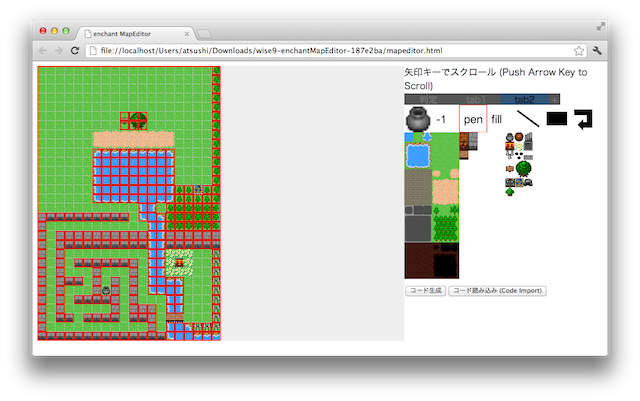
- Map は、Map Editor で作成することができる
- Map と キャラクタ(Sprite) をいったん大きな Group に所属させる
- キャラクタは Group 内の座標で操作する
- Group の Scene (game.rootScene) 内での座標を操作する
- こうすると、スクロールをうまく扱える
- キャラクタが、現在どのタイルの上にいるのかを取得するのを Map から取得するのは大変そう。宝箱や壺、町などは、Sprite として作って Map を含む Group に配置した方がいいかも
(マウスボタン押下で再生開始)
<!DOCTYPE html>
<html>
  <head>
    <meta charset="utf-8">

    <!-- スマートフォン用の指定(全画面表示) -->
    <meta name="viewport" content="width=device-width, user-scalable=no">
    <meta name="apple-mobile-web-app-capable" content="yes">
    <meta name="apple-mobile-web-app-status-bar-style" content="black-translucent">
    <!-- スマートフォン用の指定(全画面表示) -->

    <title>Lesson10</title>
    <style type="text/css">
/* ==================== STYLES ==================== */
body {
  margin: 0px;
}
/* ==================== STYLES ==================== */
    </style>
    <script type="text/javascript"
    src="https://ajax.googleapis.com/ajax/libs/jquery/1.7.1/jquery.min.js"></script>
    <script type="text/javascript" src="enchant.min.js"></script>
    <script type="text/javascript" src="draw.text.js"></script>
    <script type="text/javascript">
/* ==================== SCRIPTS ==================== */
enchant();

var baseurl = 'http://enchantjs.com/assets/sounds/';
var sounds = [
  'bgm06.wav', 'bgm07.wav', 'bgm08.wav',
  'bomb1.wav', 'bomb2.wav', 'bomb3.wav', 'bomb4.wav',
  'jingle01.wav', 'jingle02.wav', 'jingle03.wav', 'jingle04.wav', 'jingle05.wav',
  'lock1.wav', 'lock2.wav', 'lock3.wav', 'lock4.wav',
  'reload.wav',
  'se1.wav', 'se2.wav', 'se3.wav', 'se4.wav', 'se5.wav', 'se6.wav', 'se7.wav', 'se8.wav', 'se9.wav',
  'shot2.wav', 'shot3.wav', 'shot4.wav', 'shot5.wav',
  'walk1.wav', 'walk2.wav'
];
var snd;

$(document).ready(function(){
  var game = new Game(480, 320);

  game.fps = 15;

  game.onload = function() {
    for (cnt = 0; cnt < sounds.length; cnt++) {
      var x = cnt < 20 ? 0 : game.width / 2;
      var y = (cnt % 20) * 16;
      var text = new MutableText(x, y, game.width / 2, sounds[cnt]);
      text.addEventListener(Event.TOUCH_START, function(){
        snd = Sound.load(baseurl + this.text);
        snd.play();
      });
      text.addEventListener(Event.TOUCH_END, function(){
        if (snd) {
          snd.stop();
        }
      });
      game.rootScene.addChild(text);
    }
  };

  game.start();
});
/* ==================== SCRIPTS ==================== */
    </script>
  </head>
<body>
<!-- 全画面表示する場合には、body に何も書かなくてよい -->
</body>
</html>
HTML

 lesson10.html 3615件
[詳細]
 map.png 2148件
[詳細]


