
|
Javascript Learn jQuery in 30 Days (01-10) |
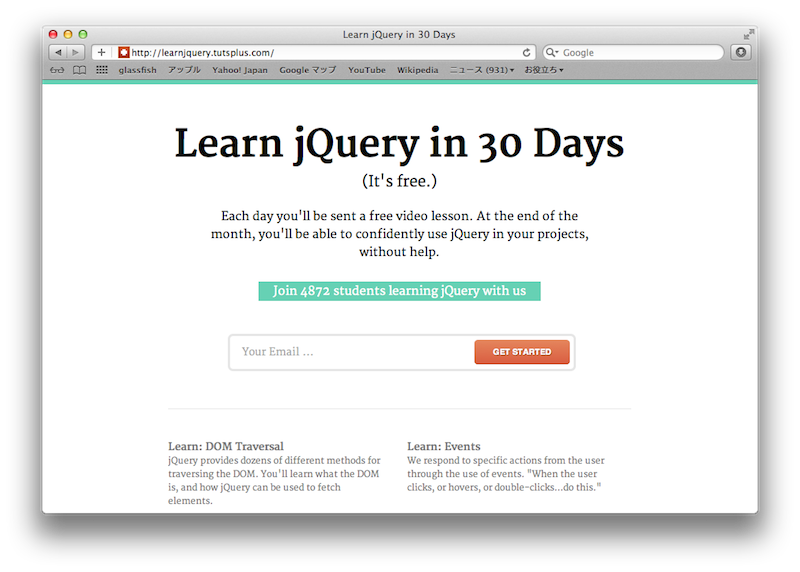
http://tutsplus.com/lesson/hello-jquery/
<script src="js/jquery-1.7.1.js"></script>代わりにGoogle Libraries API を参照
<script src="https://ajax.googleapis.com/ajax/libs/jquery/1.7.1/jquery.js"></script>
| [source] [reload] |
<!DOCTYPE html>
<html>
  <head>
    <meta charset=utf-8>
    <title>Lesson1</title>
    <style type="text/css">
/* ==================== STYLES ==================== */
.emphasis {
  color: green;
  font-weight: bold;
  font-size: large;
  text-decoration: underline;
}
/* ==================== STYLES ==================== */
    </style>
    <script type="text/javascript"
    src="https://ajax.googleapis.com/ajax/libs/jquery/1.7.1/jquery.min.js"></script>
    <script type="text/javascript">
/* ==================== SCRIPTS ==================== */
$(document).ready(function(){
  // DOM ツリーができあがってから実行される
  jQuery('ul li').css('color','red');
  jQuery('ul li').css('font-style','italic');
  $('ol li').addClass('emphasis');
});
/* ==================== SCRIPTS ==================== */
    </script>
  </head>
<body>
  <ul>
    <li>list1</li>
    <li>list2</li>
    <li>list3</li>
  </ul>
  <ol>
    <li>list1</li>
    <li>list2</li>
    <li>list3</li>
  </ol>
</body>
</html>
http://tutsplus.com/lesson/not-so-fast-jquery/
$(document).ready(function(){
  // DOM 操作
});$(function(){
// DOM 操作
});http://tutsplus.com/lesson/the-basics-of-querying-the-dom/
| [source] [reload] |
<!DOCTYPE html>
<html>
  <head>
    <meta charset=utf-8>
    <title>Lesson3</title>
    <style type="text/css">
/* ==================== STYLES ==================== */
.headerClass {
  color: green;
  font-weight: bold;
  font-size: large;
  text-decoration: underline;
}
.footerClass {
  padding-top: 20px;
  vertical-align: bottom;
  font-size: small;
}
/* ==================== STYLES ==================== */
    </style>
    <script type="text/javascript"
    src="https://ajax.googleapis.com/ajax/libs/jquery/1.7.1/jquery.min.js"></script>
    <script type="text/javascript">
/* ==================== SCRIPTS ==================== */
$(document).ready(function(){
  // ��id 指定
  $('#header').addClass('headerClass');
  // ��class 指定
  $('#footer').css('color', 'gray');
  // ��tag 指定
  $('table').css('border-spacing','0');
  // �ぢ粟�指定
  $('[type="text"]').css('text-align','right');
  // �セ厖彖�
  $('table thead tr').children().css('background','orange');
  // �Х�り返し
  $('table tbody tr').each(function(index){
    // �ν彖波峭羯慊�
    $(this).children().eq(0).text(index + 1);
    if (index % 2) {
      $(this).children().css('background','ivory');
    }
  });
});
/* ==================== SCRIPTS ==================== */
    </script>
  </head>
<body>
  <div id="header">
    <h1>ACME SHOPPING SITE</h1>
  </div>
  <div id="body">
    <table border="1">
      <thead>
        <tr>
          <th>No.</th>
          <th>品名</th>
          <th>単価</th>
          <th>個数</th>
          <th>合計</th>
        </tr>
      </thead>
      <tbody>
        <tr>
          <td></td>
          <td>Ultra Marker</td>
          <td>100</td>
          <td><input type="text" size="5" value="0"/></td>
          <td>0</td>
        </tr>
        <tr>
          <td></td>
          <td>Ultimate Eraser</td>
          <td>300</td>
          <td><input type="text" size="5" value="0"/></td>
          <td>0</td>
        </tr>
        <tr>
          <td></td>
          <td>Super Pencil</td>
          <td>50</td>
          <td><input type="text" size="5" value="0"/></td>
          <td>0</td>
        </tr>
        <tr>
          <td></td>
          <td>Hyper Card</td>
          <td>150</td>
          <td><input type="text" size="5" value="0"/></td>
          <td>0</td>
        </tr>
      </tbody>
      <tfoot>
        <tr>
          <th colspan="4">合計</th>
          <th>0</th>
        </tr>
      </tfoot>
    </table>
  </div>
  <div id="footer" class="footerClass">
    Copyright(c) ACME CO LTD 2012 All Rights Reserved.
  </div>
</body>
</html>
| �� | id指定 | $('#id') | |
| �� | class指定 | $('.class') | |
| �� | tag指定 | $('tag'), $('tag tag') | |
| �� | 属性指定 | $('[arg="val"]') | 完全一致(=)、否定一致(!=)、先頭一致(^=)、末尾一致($=)、部分一致(*=) |
| �� | 子要素の集合 | $('tag').children() | |
| �� | n番目の子要素 | $('tag').children().eq(n) | 最初の要素は 0 |
| �� | 繰り返し処理 | $('tag').each(function(index){ ... }) | indexは要素番号。 繰り返し要素は this に入る。this は Javascript の生のオブジェクトなので、jQuery の関数を使うには $(this) この要素で処理を中断する場合は return false;。return; にすると次の繰り返しに入る |
| �� | 直近の祖先要素 | $('tag').closest('parent') | |
| �� | 前後の要素 | $('tag').next(), $('tag').prev() | |
| �� | 前後の要素の集合 | $('tag').nextAll(), $('tag').prevAll() | |
| �� | 子要素の検索 | $('tag').find('.class') | <tag> 配下から .class のノードを捜す。$('tag .class')と同じ |
| �� | 要素集合からの検索 | $('tag').filter('.class') | 全ての <tag> の中から、classが .class のものを捜す |
| �� | 要素集合からの検索 | $('tag').not('.class') | 全ての <tag> の中から、classが .class でないものを捜す |
| form | :input、:text、:radio、:checkbox、:password、:submit、:image、:reset、:button、:file、:hidden |
| 状態 | :checked、:selected、:visible、:enable、:disabled、:animated |
| 子要素指定 | :first、:last、:even、:odd、:eq(n)、:gt(n)、:lt(n) |
| 他 | :has(selector) <-- selector 要素を含む |
| :contains(text) <-- text を含む | |
| :parent(selector) <-- selector の親要素 | |
| :header(selector) <-- H1、H2、H3 のこと |
$('#id').css('color','red');
$('#id').text('abc');var abc = $('#id');
abc.css('color','red');
abc.text('abc');| 属性取得 | var argVal = $('#id').attr('arg'); | |
| 属性設定 | $('#id').attr('arg','argval'); | |
| クラス追加 | $('#id').addClass('class'); | |
| クラス削除 | $('#id').removeClass('class'); | |
| クラス更新 | $('#id').toggleClass('class'); | すでに class が設定されていれば削除。そうでなければ class を追加 |
| CSS取得 | var css = $('#id').css('font-size'); | |
| CSS変更 | $('#id').css('font-size','10'); | |
| 位置取得 | alert($('#id').offset().top + "," + $('#id').offset().left) | |
| 大きさ取得 | alert($('#id').width() "," + $('#id').height() | |
| 大きさ更新 | $('#id').width(400); $('#id').height(300); | |
| DOM取得 | var div = $('#header').get(); var div = $('div').get(0); | |
| HTML取得 | var div = $('#header').html(); | |
| HTML設定 | $('#header').html('<h1>HELLO</h1>'); | |
| TEXT取得 | var text = $('#msg').text(); | |
| TEXT設定 | $('#msg').html('HELLO'); | |
| VALUE取得 | var val = $('#price').val(); | |
| VALUE設定 | $('#price').val('$9.99'); | |
| DATA取得 | var data = $('#id').data('key'); | jQueryは、DOMノードを取得する際に data を格納できるように拡張する。 イベントハンドラなどもここに格納される(一般データを格納するキーに 'event'、'handle' を使ってはいけない)。 あと、でかいデータを置いたらいかんよ |
| DATA設定 | $('#id').data('key','val'); | |
| DATA削除 | $('#id').removeData('key'); | 引数なしで removeData() を呼び出すと、jQuery による拡張が全て削除されるので、必ず引数付きで呼び出す。 undefined、null、0 を引数に指定すると、引数なしと見なされる |
| [source] [reload] |
<!DOCTYPE html>
<html>
<head>
	<meta charset=utf-8>
	<title>Lesson4</title>
	<style type="text/css">
/* ==================== STYLES ==================== */
.day {
	color: black;
	background : yellow;
}
.night {
	color: white;
	background : black;
}
/* ==================== STYLES ==================== */
	</style>
	<script type="text/javascript"
	src="https://ajax.googleapis.com/ajax/libs/jquery/1.7.1/jquery.min.js"></script>
  <script type="text/javascript">
/* ==================== SCRIPTS ==================== */
$(document).ready(function(){
	// <body> をキャッシュする。
	// javascript の function はクロージャーなので、関数が状態を持てる。→ ここでキャッシュして良い
	var body = $('body');
	body.addClass('day');

	// $('button').click(function() {...}) とも書ける
	$('button').on('click', function() {
		// button クリック時のイベントハンドラ

		// イベントソースの DOM要素は this
		// jQurye 拡張をするために $(this) する
		// jQuery 拡張された this は $this とする命名規約にするとよろし
		var $this = $(this);
		var stylesheet = $this.data('css');

		body.removeClass();
		body.addClass(stylesheet);

		$this
			.siblings() // 自分以外の兄弟ノードを返す
				.removeAttr('disabled')
				.end()    // <-- This is tricky jargon of jQueyr.
			.attr('disabled', 'disabled');
	});
});
/* ==================== SCRIPTS ==================== */
</script>
</head>
<body>
  <h1>My Website</h1>
  <button data-css="day" disabled>Day</button>
  <button data-css="night">Night</button>
</body>
</html>
$(element).on('event', function(){
  ...
});
$(element).off('event');
| イベント | イベント名 | 備考 | |
| フォーカス | 得る | focus, focusin | |
| 失う | blur, focusout | ||
| ページ | 読み込み | load | |
| 遷移 | unload | ページ遷移とブラウザ終了で起きるイベント。両者は区別できないのでブラウザ終了判定は難しい | |
| 大きさ変更 | resize | ||
| スクロール | scroll | ||
| クリック | click | ||
| ダブルクリック | dblclick | ||
| マウス | ボタン押した | mousedown | |
| ボタン放した | mouseup | ||
| 移動 | mousemove | ||
| 入った | mouseover, mouseenter | ||
| 出た | mouseout, mouseleave | ||
| 値変更 | change | ||
| 選択された | select | ||
| Form Submit | submit | "form.onReset = function(){...}" は jQuery では指定できない | |
| キー | 押す | keydown | |
| 押している | keypress | ||
| 放した | keyup | ||
| エラー発生 | error | window.onerror()(全体的なエラー),image.onerror()(画像読み込み失敗) など | |
| 右クリックメニュー呼び出し時 | contextmenu | false を返すと右クリックメニュー(contextmenu)は表示されない | |
$this
  .siblings() // 自分以外の兄弟ノードを返す
    .removeAttr('disabled')
    .end()    // <-- This is tricky jargon of jQueyr.
  .attr('disabled', 'disabled');
  ${兄弟ノード}
    .removeAttr('disabled')
    .end()    // <-- This is tricky jargon of jQueyr.
.attr('disabled', 'disabled'); ${兄弟ノード}
.end() // <-- This is tricky jargon of jQueyr.
.attr('disabled', 'disabled'); $this
.attr('disabled', 'disabled');http://tutsplus.com/lesson/events-201/
| [source] [reload] |
<!DOCTYPE html>
<html>
<head>
	<meta charset=utf-8>
	<title>Lesson5</title>
	<style type="text/css">
/* ==================== STYLES ==================== */
dl {
	width: 300px;
}
dt {
  cursor: pointer;
  width: 300px;
  font-weight: bold;
  background: lavender;
  border-top: 1px solid white;
  border-bottom: 1px solid gray;
}
dd {
	margin: 0;
  cursor: pointer;
  width: 300px;
  font-weight: bold;
  background: lightyellow;
  border-top: 1px solid white;
  border-bottom: 1px solid gray;
  display: none;
}
/* ==================== STYLES ==================== */
	</style>
	<script type="text/javascript"
	src="https://ajax.googleapis.com/ajax/libs/jquery/1.7.1/jquery.min.js"></script>
  <script type="text/javascript">
/* ==================== SCRIPTS ==================== */
$(document).ready(function(){
	$('dl').on('mouseover', 'dt', function() {
		$(this)
			.next() // <-- next() returns the next dd
				.slideDown(200) // <-- gradually show ovew 200ms
				.siblings('dd') // <-- all other dd
					.slideUp(200); // <-- gradually hide over 200ms
	});
	$('dl').on('mouseout', function() {
		$(this).find('dd').slideUp(200);
	});
});
/* ==================== SCRIPTS ==================== */
  </script>
</head>
<body>
↓マウスポインタを漢字に合わせてみて
<dl>
	<dt>山原水鶏</dt>
	<dd>やんばるくいな</dd>
	<dt>木莵</dt>
	<dd>みみずく</dd>
	<dt>杜鵑</dt>
	<dd>ほととぎす</dd>
	<dt>��</dt>
	<dd>くまたか</dd>
	<dt>翡翠</dt>
	<dd>かわせみ</dd>
</dl>
</body>
</html>
dt {
  border-top: 1px solid white;
  border-bottom: 1px solid gray;
}
上に薄い色の border を設定して、下に濃い色の border を設定すると、立体的っぽく見える$('dl dt').on('mouseover', function() {
...
});$('dl').on('mouseover', 'dt', function() {
...
});| 隠す | $('id').hide() |
| 表示する | $('id').show() |
| 隠す | $('id').slideUp() |
| 表示する | $('id').slideDown() |
| 隠す | $('id').fadeOut() |
| 表示する | $('id').fadeIn() |
http://tutsplus.com/lesson/bind-live-delegate-huh/
jQuery.fn.extend({
...
  bind: function( types, data, fn ) {
    return this.on( types, null, data, fn );
  },
  unbind: function( types, fn ) {
    return this.off( types, null, fn );
  },

  live: function( types, data, fn ) {
    jQuery( this.context ).on( types, this.selector, data, fn );
    return this;
  },
  die: function( types, fn ) {
    jQuery( this.context ).off( types, this.selector || "**", fn );
    return this;
  },

  delegate: function( selector, types, data, fn ) {
    return this.on( types, selector, data, fn );
  },
  undelegate: function( selector, types, fn ) {
    // ( namespace ) or ( selector, types [, fn] )
    return arguments.length == 1? this.off( selector, "**" ) : this.off( types, selector, fn );
  },
...$('#id').on('event', function(){...});
$('#id').on('event', 'selector', function(){...});$('#id').off('event');
$('#id').off('event', 'selector');http://tutsplus.com/lesson/creating-and-appending-content/
| [source] [reload] |
<!DOCTYPE html>
<html>
  <head>
    <meta charset=utf-8>
    <title>Lesson8</title>
    <style type="text/css">
/* ==================== STYLES ==================== */
table, td, th {
  border: 1px darkblue solid;
  border-spacing: 0;
}
button.up {
  color: white;
  background-color: red;
}
button.up:hover {
  background-color: darkred;
}
button.up:disabled {
  background-color: pink;
}
button.down {
  color: white;
  background-color: blue;
}
button.down:hover {
  background-color: darkblue;
}
button.down:disabled {
  background-color: lavender;
}
/* ==================== STYLES ==================== */
    </style>
    <script type="text/javascript"
    src="https://ajax.googleapis.com/ajax/libs/jquery/1.7.1/jquery.min.js"></script>
    <script type="text/javascript">
/* ==================== SCRIPTS ==================== */
$(document).ready(function(){

  $('button.up').on('click',function(){
    onUpButtonClicked($(this));
  });

  $('button.down').on('click',function(){
    onDownButtonClicked($(this));
  });

  $('button#addTop').on('click',function(){
    // tbody の子要素の先頭に追加
    $('tbody').prepend(createQueueRow());
    disbleTopAndBottomButton();
  });

  $('button#addBottom').on('click',function(){
    // tbody の子要素の末尾に追加
    $('tbody').append(createQueueRow());
    disbleTopAndBottomButton();
  });

  disbleTopAndBottomButton();
});

function onUpButtonClicked(btnComponet) {
    var row = btnComponet.closest('tr');
    // 前の tr の前に移動する
    row.prev().before(row);
    disbleTopAndBottomButton();
}

function onDownButtonClicked(btnComponent) {
    var row = btnComponent.closest('tr');
    // 次の tr の次に移動する
    row.next().after(row);
    disbleTopAndBottomButton();
}

function disbleTopAndBottomButton() {

  $('button').removeAttr('disabled');

  $('button.up').first().attr('disabled','disabled');
  $('button.down').last().attr('disabled','disabled');
}

function createQueueRow() {

  var order = $('#order')[0].value;
  if (order == '') {
    return;
  }
  $('#order')[0].value = '';

  var tr = $('<tr></tr>');

  // 1列目
  var td1 = $('<td></td>');

  var downBtn = $('<button></button>',{
    class: 'down',
    text: '↓'
  });
  var upBtn = $('<button></button>',{
    class: 'up',
    text: '↑'
  });

  td1.append(downBtn);
  td1.append('\n'); // 見た目のため HTML に合わせて改行を入れる
  td1.append(upBtn);

  tr.append(td1);

  // 2列目
  var td2 = $('<td></td>');
  td2.append(order);
  tr.append(td2);

  // イベントハンドラ追加
  upBtn.on('click',function(){
    onUpButtonClicked($(this));
  });

  downBtn.on('click',function(){
    onDownButtonClicked($(this));
  });


  return tr;
}
/* ==================== SCRIPTS ==================== */
    </script>
  </head>
<body>
  <table class="table">
    <thead>
      <tr><th></th><th>Task Queue</th></tr>
    </thead>
    <tbody>
      <tr>
        <td>
          <button class="down">↓</button>
          <button class="up">↑</button>
        </td>
        <td>ビール</td>
      </tr>
      <tr>
        <td>
          <button class="down">↓</button>
          <button class="up">↑</button>
        </td>
        <td>日本酒</td>
      </tr>
      <tr>
        <td>
          <button class="down">↓</button>
          <button class="up">↑</button>
        </td>
        <td>ウイスキー</td>
      </tr>
    </tbody>
    <tfoot>
    </tfoot>
  </table>
  <hr/>
  <input id="order" type="text" placeholder="ご注文"/>
  <button id="addTop">すぐ欲しい</button>
  <button id="addBottom">あとででいいよ</button>
</body>
</html>
| p の子要素として c を追加 | 先頭 | p.prepend(c), c.prependTo(p) |
| 末尾 | p.append(c), c.appendTo(p) | |
| b の兄弟要素として c を追加 | 前 | p.before(c), c.insertBefore(c) |
| 後 | p.after(c), c.insertAfter(b) |
http://tutsplus.com/lesson/slides-and-structure/
| [source] [reload] |
<!DOCTYPE html>
<html>
  <head>
    <meta charset=utf-8>
    <title>Lesson9</title>
    <style type="text/css">
/* ==================== STYLES ==================== */
#orderForm {
  width: 300px;
  font-size: 10px;
  background: lightgray;
  padding: 1em 2em;
  position: relative;
}

/* Javascript が有効なときのみ CSS を適用するテクニック */
.js #orderForm {
  position: absolute;
  top: 0;
  display: none;
}

#orderForm h2 { margin-top: 0; }

#orderForm ul { padding: 0; }

#orderForm li {
  list-style: none;
  margin-bottom: 1em;
}

.btnClose {
  position: absolute;
  right: 10px;
  top: 10px;
  border: 1px solid;
  font-size: 0.5em;
  cursor: pointer;
}

/* Form inputs */
input, textarea { width: 100%; line-height: 2em;}
input[type=submit] { width: auto; text-align:right;}
label { color: black; display: block; text-align: left; }
/* ==================== STYLES ==================== */
    </style>
    <script type="text/javascript"
    src="https://ajax.googleapis.com/ajax/libs/jquery/1.7.1/jquery.min.js"></script>
    <script type="text/javascript">
/* ==================== SCRIPTS ==================== */
$(document).ready(function(){
  // Javascript が有効なときに、特定の CSS を適用したいときのテクニック
  $('html').addClass('js');

  formWindow.init($('#orderForm') , {
    effect : 'fadeToggle',
    speed : 1000
  });
});

var formWindow = {
  container : null,

  config: {
    effect: 'slideToggle',
    speed: 500
  },

  init : function(container, config) {
    this.container = container;
    if (config) {
      $.extend(this.config, config);
    }

    // ×ボタン
    $('<span> X </span>')
      .prependTo(container)
      .on('click', this.close)
      .addClass('btnClose');

    // Form表示ボタン
    $('<button></button>', {
      text: 'ORDER HERE!'
    })
      .insertAfter(container.before())
      .on('click', this.show);
  },

  show : function() {
    var obj = formWindow.container;
    var fnc = formWindow.config.effect;
    var arg = formWindow.config.speed;
    // javascript の reflection
    obj[fnc](arg);
  },

  close : function() {
    var obj = formWindow.container;
    var fnc = formWindow.config.effect;
    var arg = formWindow.config.speed;
    // javascript の reflection
    obj[fnc](arg);
  }
}
/* ==================== SCRIPTS ==================== */
    </script>
  </head>
<body>
  <div id="header">
    <h1>ACME DREAM HEAD MASSAGER</h1>
  </div>
  <div id="body">
    <p>This scalp massager will take you to ultimate relaxing place.</p>
    <p>Specialized 12 fingers will bend to fit your head skin.
    They are glide smoothly across the surface of your scalp, and improve your blood circulations.
    This technology was developed by NASA and deployed to the ISS(International Space Station).</p>
    <p>Usually, it is 1000 Perica for one, but now it is 1000 Perica for two.
    Don't miss this chance. </p>
  </div>
  <div id="orderForm">
    <h2>Order Form</h2>
    <form action="#">
      <ul>
        <li>
          <label for="name">Name: </label>
          <input name="name" id="name">
        </li>

        <li>
          <label for="emal">Email Address: </label>
          <input name="email" id="email">
        </li>

        <li>
          <label for="address">Address: </label>
          <input name="address" id="address">
        </li>

        <li>
          <label for="creditcard">Credit Card: </label>
          <input name="card" id="card">
        </li>

        <li>
          <label for="amount">Amount: </label>
          <input name="amount" id="amount">
        </li>

        <li>
          <input type="submit" value="Submit">
        </li>
      </ul>
    </form>
  </div>
</body>
</html>
.js #orderForm {
  position: absolute;
  top: 0;
  display: none;
}$('html').addClass('js');var obj = formWindow.container; var fnc = formWindow.config.effect; var arg = formWindow.config.speed; obj[fnc](arg);obj の fnc を引数 arg で呼び出す
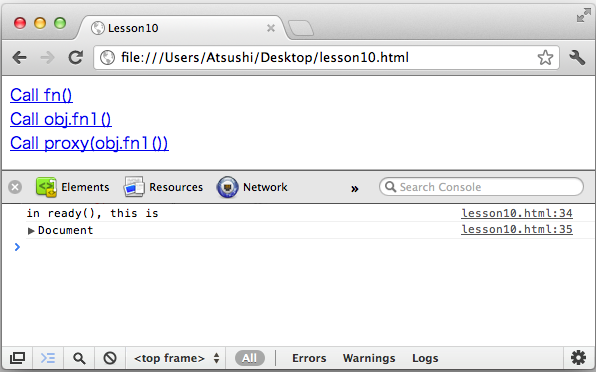
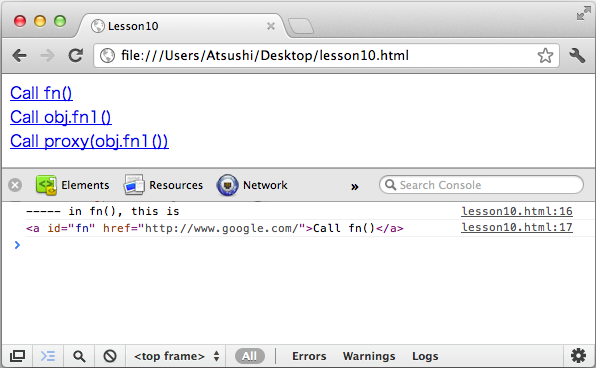
http://tutsplus.com/lesson/the-this-keyword/
<!DOCTYPE html>
<html>
  <head>
    <meta charset=utf-8>
    <title>Lesson10</title>
    <style type="text/css">
/* ==================== STYLES ==================== */
/* ==================== STYLES ==================== */
    </style>
    <script type="text/javascript"
    src="https://ajax.googleapis.com/ajax/libs/jquery/1.7.1/jquery.min.js"></script>
    <script type="text/javascript">
/* ==================== SCRIPTS ==================== */
function fn(e) {
  e.preventDefault();
  console.log("----- in fn(), this is");
  console.log(this);
}

var obj = {
  fn1 : function(e) {
    e.preventDefault();
    console.log("----- in obj.fn1(), this is");
    console.log(this);
    obj.fn2();
  },
  fn2 : function() {
    console.log("----- in obj.fn2(), this is");
    console.log(this);
  }
}

$(document).ready(function(){
  console.log("in ready(), this is");
  console.log(this);

  $('a#fn').on('click', fn);
  $('a#obj').on('click', obj.fn1);
  $('a#proxy').on('click', $.proxy(obj.fn1, obj));
});
/* ==================== SCRIPTS ==================== */
    </script>
  </head>
<body>
  <a id="fn" href="http://www.google.com/">Call fn()</a><br/>
  <a id="obj" href="http://www.google.com/">Call obj.fn1()</a><br/>
  <a id="proxy" href="http://www.google.com/">Call proxy(obj.fn1())</a><br/>
</body>
</html>
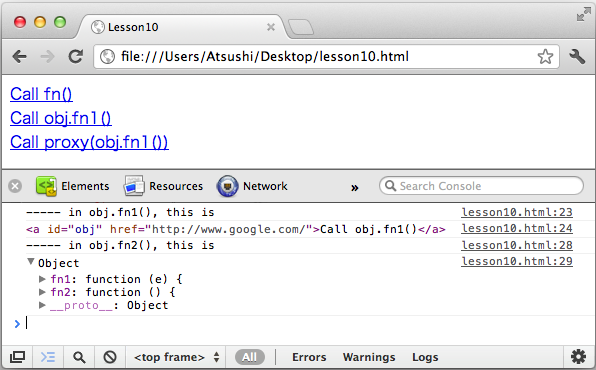
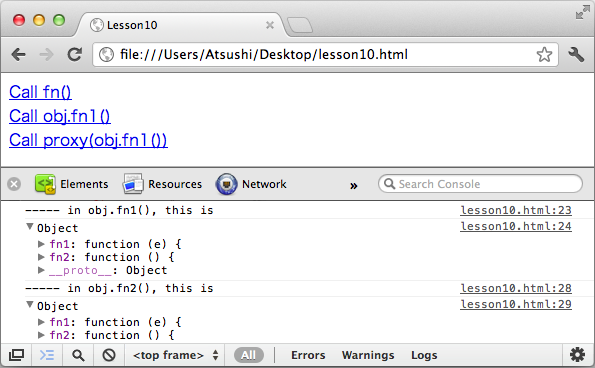
→ Day 11 以降 : Javascript Learn jQuery in 30 Days (11-20)
 this4.png 2509件
[詳細]
 quiz1.png 2614件
[詳細]
 this3.png 2487件
[詳細]
 30days.png 2746件
[詳細]
 this2.png 2559件
[詳細]
 this1.png 2587件
[詳細]
 lesson10.html 3986件
[詳細]
lesson9.html 4162件
[詳細]
lesson8.html 3813件
[詳細]
lesson5.html 3868件
[詳細]
lesson3.html 3894件
[詳細]
lesson1.html 4261件
[詳細]
lesson4.html 4021件
[詳細]


